> ## Documentation Index
> Fetch the complete documentation index at: https://docs.churningtracker.com/llms.txt
> Use this file to discover all available pages before exploring further.
# Deals
> Browse live deals from every connected buying group in one feed, and let expected payouts fill themselves in.
The deals feed under **Integrations → Buying Groups → Deals** pulls active deals from all 14 supported groups into one searchable table. It refreshes every five minutes. Deals are available on the Enthusiast and Whale plans.
 ## Reading the feed
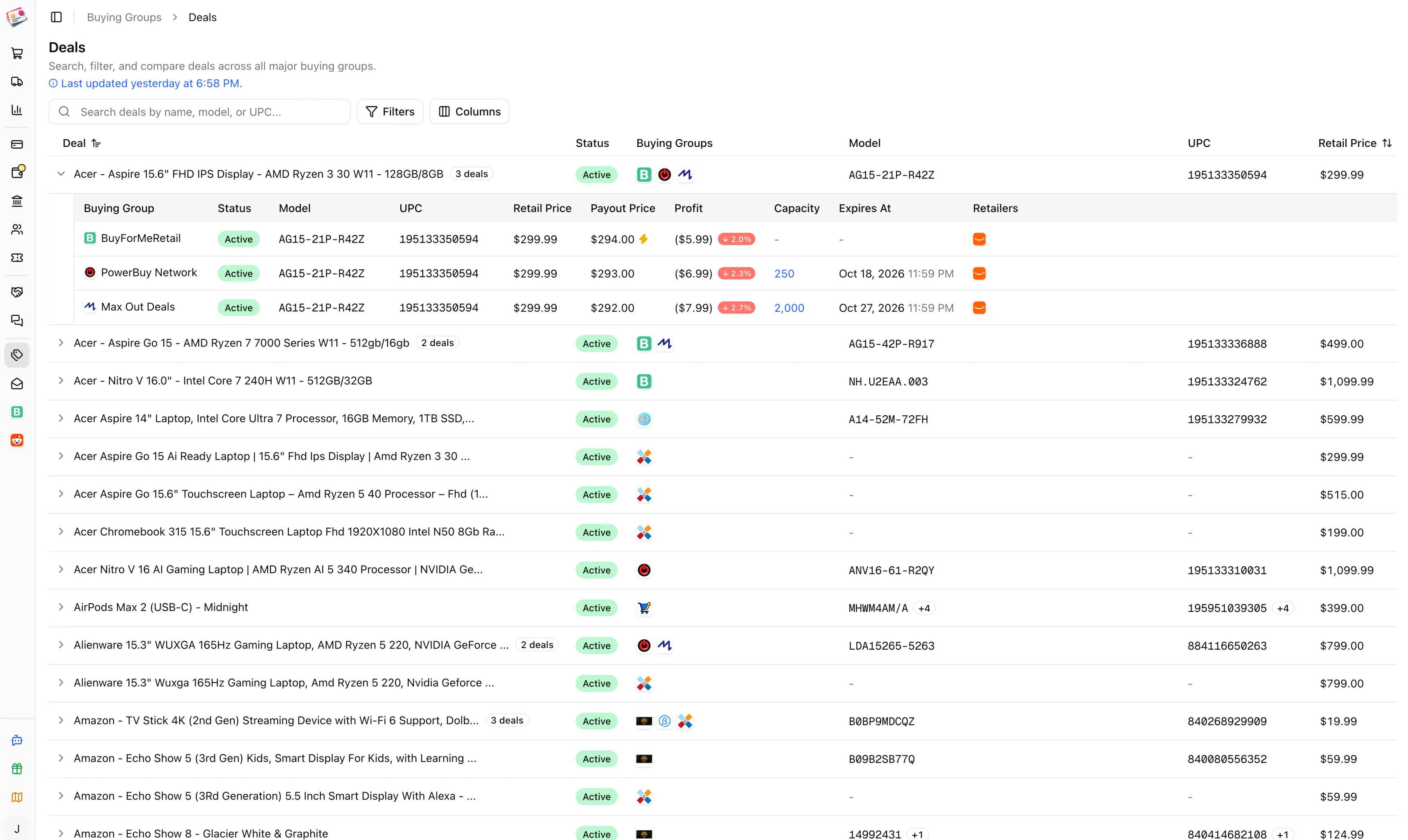
Deals for the same product are grouped into one row, matched by model number or UPC, so a laptop listed by four groups shows once. The row shows the best deal on top: active deals first, then the highest profit percentage, then the highest payout. Expand a row to see every group's version with its payout, profit, remaining capacity, expiry, and the retailers that carry it. A lightning icon on a BFMR deal means the group pays out the same day.
Columns: Deal, Status, Buying Groups, Model, UPC, Retail Price, Best Payout, Best Profit, Synced At, Expires At. Hover **Last updated** to see when each group was last synced.
* **Search** matches the deal name, model, or UPC.
* **Filters**: buying group, deal type (above cost, at cost, below cost), retailer, status (active, inactive, expired), and whether the deal still has capacity.
## Expected payouts from deals
On paid plans, the feed also fills in expected payouts for you. When you save a new buying group order line item with a model number of at least three characters and no expected payout, Churning Tracker looks for an active deal from that group with a matching model or UPC and uses its payout. A sparkle icon next to the amount shows it was inferred.
This only happens for the 14 built-in groups, only for new line items, and only when you left the expected payout empty. Type a payout yourself and it's used as is.
## Getting notified
To hear about new deals without watching the feed, set up [deal alerts](/buying-groups/deal-alerts).
This documentation is built and hosted on [Mintlify](https://mintlify.com), a developer documentation platform.
## Reading the feed
Deals for the same product are grouped into one row, matched by model number or UPC, so a laptop listed by four groups shows once. The row shows the best deal on top: active deals first, then the highest profit percentage, then the highest payout. Expand a row to see every group's version with its payout, profit, remaining capacity, expiry, and the retailers that carry it. A lightning icon on a BFMR deal means the group pays out the same day.
Columns: Deal, Status, Buying Groups, Model, UPC, Retail Price, Best Payout, Best Profit, Synced At, Expires At. Hover **Last updated** to see when each group was last synced.
* **Search** matches the deal name, model, or UPC.
* **Filters**: buying group, deal type (above cost, at cost, below cost), retailer, status (active, inactive, expired), and whether the deal still has capacity.
## Expected payouts from deals
On paid plans, the feed also fills in expected payouts for you. When you save a new buying group order line item with a model number of at least three characters and no expected payout, Churning Tracker looks for an active deal from that group with a matching model or UPC and uses its payout. A sparkle icon next to the amount shows it was inferred.
This only happens for the 14 built-in groups, only for new line items, and only when you left the expected payout empty. Type a payout yourself and it's used as is.
## Getting notified
To hear about new deals without watching the feed, set up [deal alerts](/buying-groups/deal-alerts).
This documentation is built and hosted on [Mintlify](https://mintlify.com), a developer documentation platform.