> ## Documentation Index
> Fetch the complete documentation index at: https://docs.churningtracker.com/llms.txt
> Use this file to discover all available pages before exploring further.
# Bank bonuses
> Track checking, savings, and brokerage bonuses with their deposit requirements, holds, and deadlines.
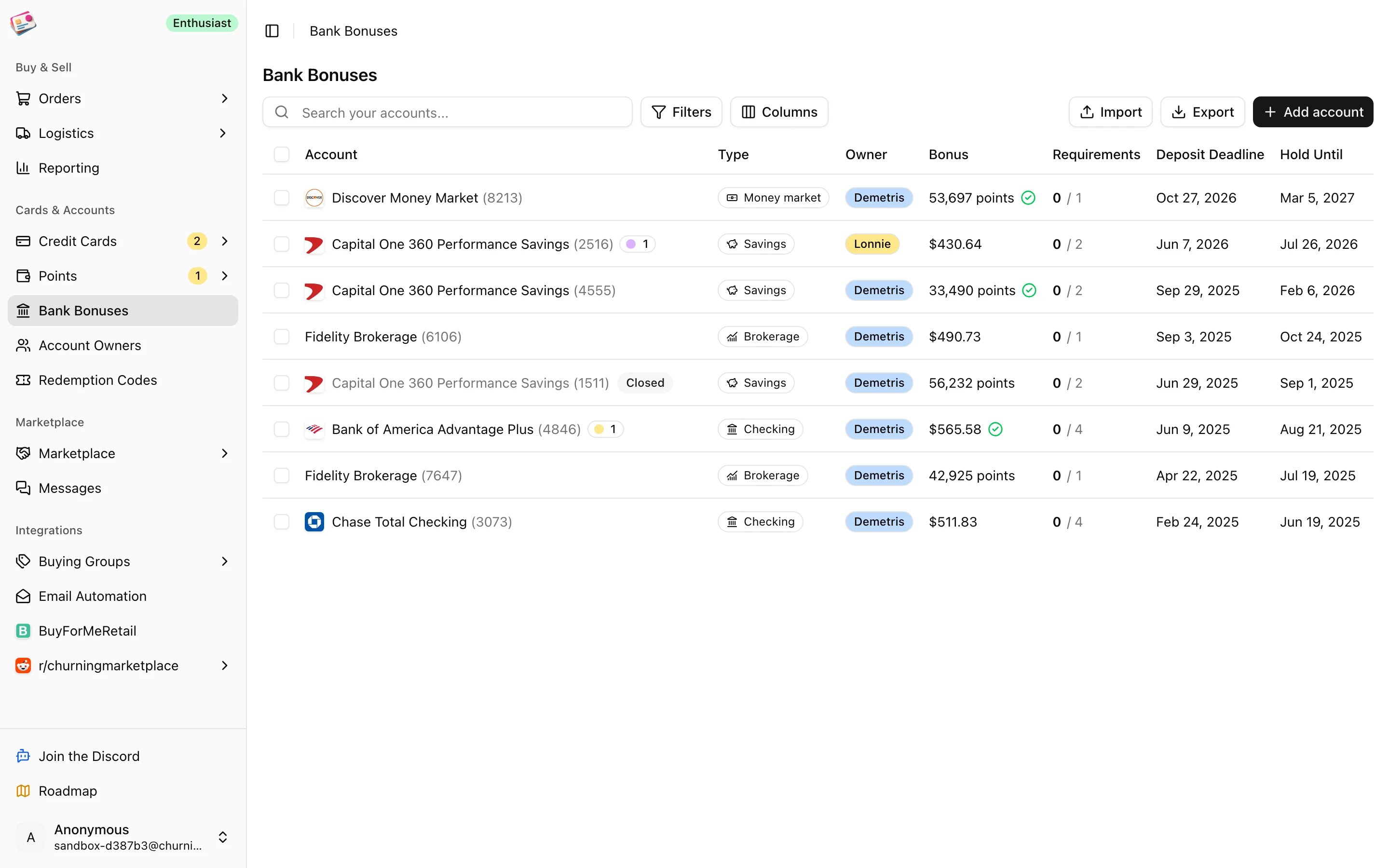
A bank bonus has a lot of moving parts: a deposit you have to make, a balance you have to hold, a deadline, and a payout that shows up weeks later. The **Bank Bonuses** page under **Cards & Accounts** keeps each account's requirements and progress in one row, so you can see what's still owed before the deadline passes.
 ## Add an account
Click **Add account**.
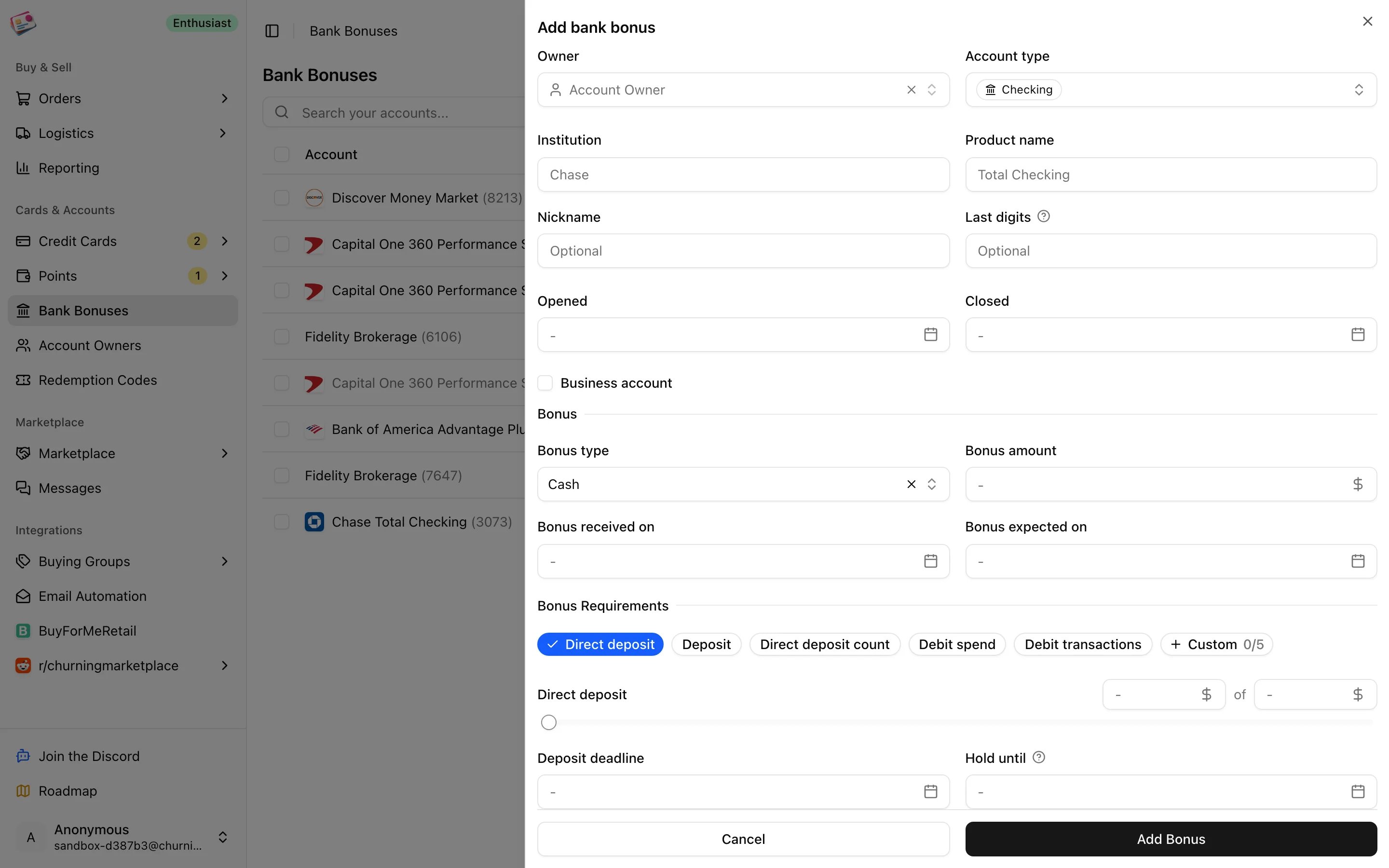
Pick the owner and account type (checking, savings, brokerage, retirement, HSA, CD, money market, or other), then enter the institution and product name, for example Chase and Total Checking. Nickname, last digits, opened and closed dates, and a business flag are optional.
Choose cash or points, enter the amount, and set the date you expect it. Leave **Bonus received on** empty for now; filling it in later is how you mark the bonus as paid.
Click the requirement types that apply. Each one becomes a progress row with a slider for how far along you are:
* **Direct deposit** (checking, savings, money market)
* **Deposit** and **Deposit count**
* **Debit spend** and **Debit transactions** (checking)
* **Custom**, up to five, counting dollars or a number
Deposit requirements add a **Deposit deadline** and a **Hold until** date for how long the balance has to stay. Debit requirements add a **Debit spend deadline**. The pickers show how many days each date is from the open date.
Click **Add Bonus**. Notes, tags, and up to five attachments can be added when editing.
## Add an account
Click **Add account**.
Pick the owner and account type (checking, savings, brokerage, retirement, HSA, CD, money market, or other), then enter the institution and product name, for example Chase and Total Checking. Nickname, last digits, opened and closed dates, and a business flag are optional.
Choose cash or points, enter the amount, and set the date you expect it. Leave **Bonus received on** empty for now; filling it in later is how you mark the bonus as paid.
Click the requirement types that apply. Each one becomes a progress row with a slider for how far along you are:
* **Direct deposit** (checking, savings, money market)
* **Deposit** and **Deposit count**
* **Debit spend** and **Debit transactions** (checking)
* **Custom**, up to five, counting dollars or a number
Deposit requirements add a **Deposit deadline** and a **Hold until** date for how long the balance has to stay. Debit requirements add a **Debit spend deadline**. The pickers show how many days each date is from the open date.
Click **Add Bonus**. Notes, tags, and up to five attachments can be added when editing.
 ## Keeping it up to date
Edit the account and move the sliders as deposits land. The **Requirements** column shows how many are met; a green check means every deposit requirement is met, and a dashed check means they're met but the hold period is still running. When the bonus posts, set **Bonus received on**.
The account's status is worked out for you: Open until you add requirements, In progress while some are unmet, Requirements met, Bonus received, and Closed once a closed date is set.
## Working with the table
* **Filters**: tags, account type, owner, hide closed accounts, bonus not yet received.
* **Duplicate** copies the offer and requirement targets for a new account without the progress or dates, handy when you open the same bonus for another owner.
* **Bulk actions**: update tags.
* Import a list from a spreadsheet with [CSV imports](/imports/csv-imports) or download one with [CSV exports](/csv-exports).
This documentation is built and hosted on [Mintlify](https://mintlify.com), a developer documentation platform.
## Keeping it up to date
Edit the account and move the sliders as deposits land. The **Requirements** column shows how many are met; a green check means every deposit requirement is met, and a dashed check means they're met but the hold period is still running. When the bonus posts, set **Bonus received on**.
The account's status is worked out for you: Open until you add requirements, In progress while some are unmet, Requirements met, Bonus received, and Closed once a closed date is set.
## Working with the table
* **Filters**: tags, account type, owner, hide closed accounts, bonus not yet received.
* **Duplicate** copies the offer and requirement targets for a new account without the progress or dates, handy when you open the same bonus for another owner.
* **Bulk actions**: update tags.
* Import a list from a spreadsheet with [CSV imports](/imports/csv-imports) or download one with [CSV exports](/csv-exports).
This documentation is built and hosted on [Mintlify](https://mintlify.com), a developer documentation platform.