> ## Documentation Index
> Fetch the complete documentation index at: https://docs.churningtracker.com/llms.txt
> Use this file to discover all available pages before exploring further.
# Listings
> Browse the catalog, post what you're selling or looking for, and manage your listings.
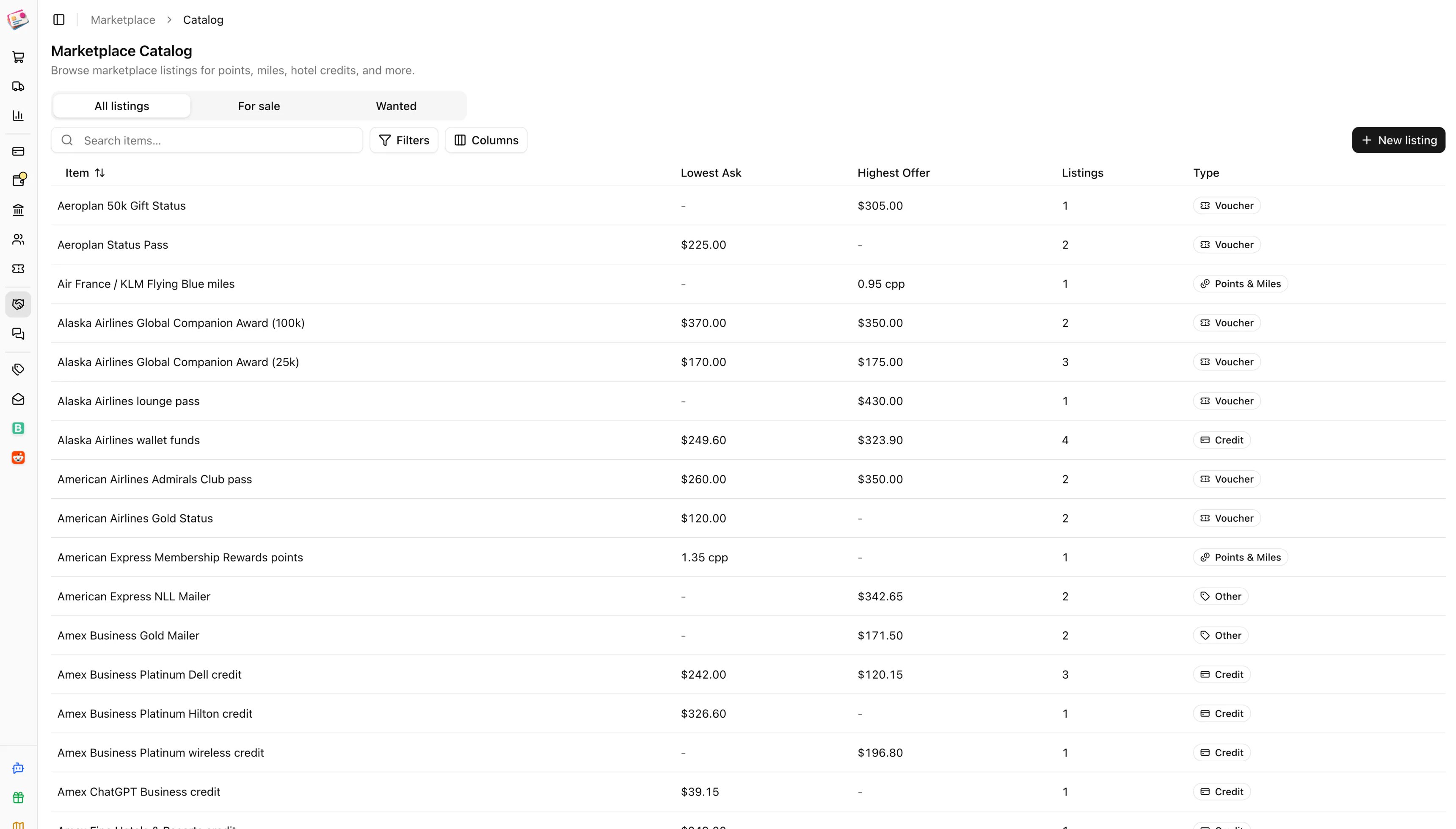
The Marketplace is where Churning Tracker users buy and sell points, miles, vouchers, credits, and gift cards with each other. Listings are organized by catalog item rather than by thread, so you can see every open offer for, say, Hyatt points in one place, with the lowest ask, the highest offer, and what past sales went for. It's under **Marketplace** in the sidebar.
 Churning Tracker doesn't hold money or items and charges no fees. You arrange payment and delivery with the other party directly, and keep the conversation in [Messages](/marketplace/messages) so there's a record.
## Before you start
The first time you open the Marketplace you'll be asked to choose a username: 3 to 32 characters, letters, numbers, underscores, and hyphens. It's what other users see. You can change it once every 30 days from the profile card on **My Listings**.
The Marketplace isn't available in the sandbox.
## Browse the catalog
The catalog has tabs for **All listings**, **For sale**, and **Wanted**. Search by item name, or filter by type and by items with listings posted in the last week. Items with active listings sort first.
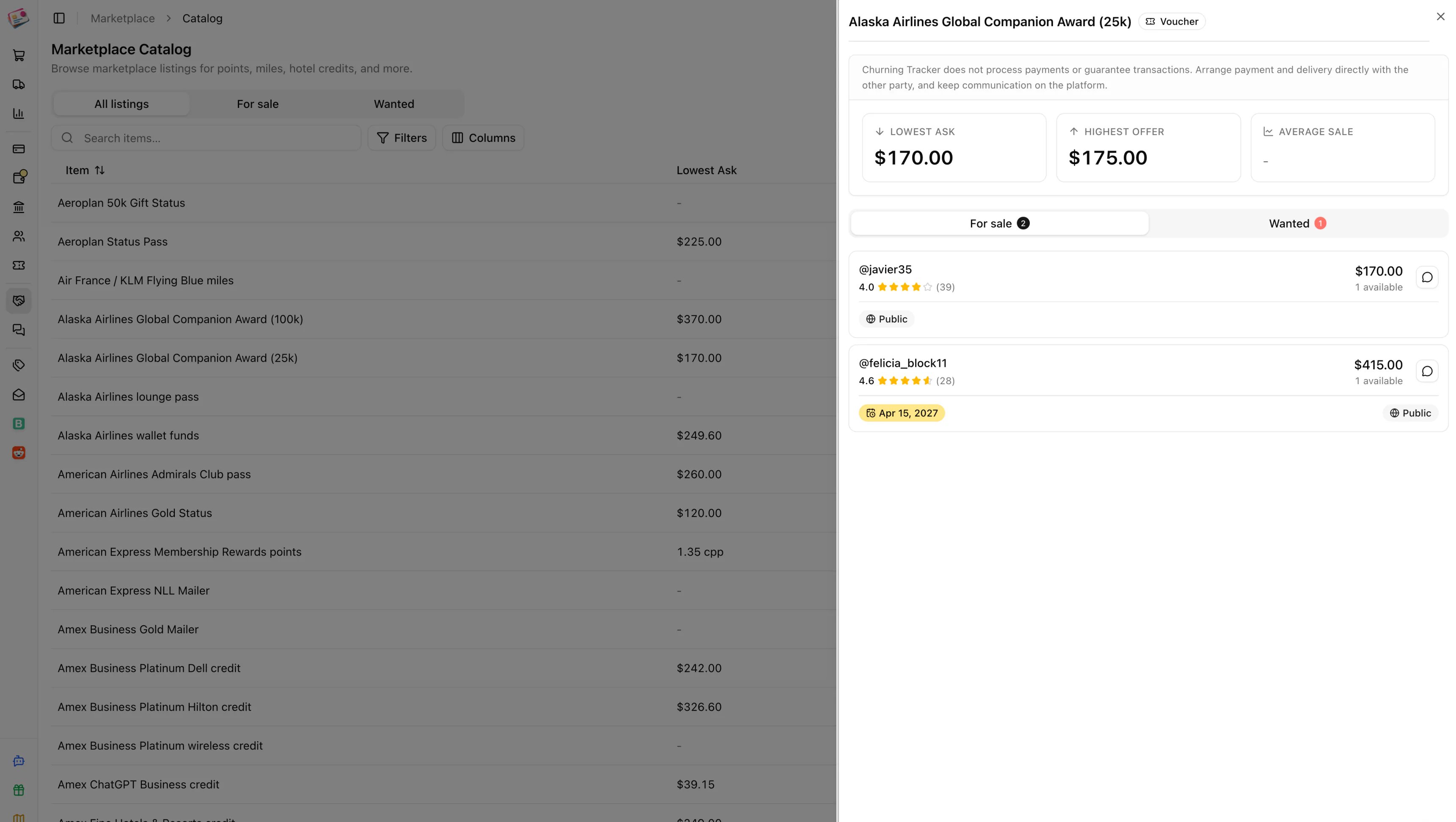
Click an item to open its sheet: the lowest ask, highest offer, and average confirmed sale price, then the open listings on each side. Each listing shows the seller's name, their rating and completed-trade count, price and quantity, and any value, expiry, or group badges. Prices for points show in cents per point. Click the message icon on a listing to [start a conversation](/marketplace/messages). **Sale history** on an item lists past completed trades; a green check means both parties confirmed the price and quantity.
Churning Tracker doesn't hold money or items and charges no fees. You arrange payment and delivery with the other party directly, and keep the conversation in [Messages](/marketplace/messages) so there's a record.
## Before you start
The first time you open the Marketplace you'll be asked to choose a username: 3 to 32 characters, letters, numbers, underscores, and hyphens. It's what other users see. You can change it once every 30 days from the profile card on **My Listings**.
The Marketplace isn't available in the sandbox.
## Browse the catalog
The catalog has tabs for **All listings**, **For sale**, and **Wanted**. Search by item name, or filter by type and by items with listings posted in the last week. Items with active listings sort first.
Click an item to open its sheet: the lowest ask, highest offer, and average confirmed sale price, then the open listings on each side. Each listing shows the seller's name, their rating and completed-trade count, price and quantity, and any value, expiry, or group badges. Prices for points show in cents per point. Click the message icon on a listing to [start a conversation](/marketplace/messages). **Sale history** on an item lists past completed trades; a green check means both parties confirmed the price and quantity.
 ## Post a listing
Click **New listing** on the catalog or on My Listings. Choose **For sale** or **Wanted**.
The item picker is grouped by type. If the thing you're selling isn't there, use the **Submit a request** link under the picker.
For points, enter the price in cents per point or as a total; the form converts between them. For everything else, enter a unit price. A price of zero means free.
Listings default to all your [groups](/marketplace/groups) plus the public marketplace. Tick **Hide from public marketplace** to keep it inside your groups; then at least one group is required. Gift cards never appear publicly and only show in groups that allow them.
Credits, gift cards, and other items can carry a face value. Vouchers, credits, and other items can carry an expiration date. Notes go up to 2,000 characters. Click **Create**.
A new listing is open for 30 days. If it's public, it's also posted to Churning Tracker's Discord channel, and groups that have a webhook configured get it too.
## Manage your listings
**My Listings** shows your profile card with your rating, completed trades, and reviews, and a table of everything you've posted with its status, visibility, price, and expiry. Filter by status, type, or group.
From a listing's row menu:
* **Edit** the quantity, price, visibility, and notes. The listing type and item can't change.
* **Mark as pending** while a deal is in progress, and back to **open** if it falls through.
* **Mark as sold** closes it. **Re-open** brings a closed listing back.
* **Renew listing** adds 30 days. It's offered in the last week before expiry and after a listing has expired.
* **Archive** hides it for good.
Listings expire on their own after 30 days. You'll get an email three days before, and another when it expires. Renewing an expired listing reopens it.
This documentation is built and hosted on [Mintlify](https://mintlify.com), a developer documentation platform.
## Post a listing
Click **New listing** on the catalog or on My Listings. Choose **For sale** or **Wanted**.
The item picker is grouped by type. If the thing you're selling isn't there, use the **Submit a request** link under the picker.
For points, enter the price in cents per point or as a total; the form converts between them. For everything else, enter a unit price. A price of zero means free.
Listings default to all your [groups](/marketplace/groups) plus the public marketplace. Tick **Hide from public marketplace** to keep it inside your groups; then at least one group is required. Gift cards never appear publicly and only show in groups that allow them.
Credits, gift cards, and other items can carry a face value. Vouchers, credits, and other items can carry an expiration date. Notes go up to 2,000 characters. Click **Create**.
A new listing is open for 30 days. If it's public, it's also posted to Churning Tracker's Discord channel, and groups that have a webhook configured get it too.
## Manage your listings
**My Listings** shows your profile card with your rating, completed trades, and reviews, and a table of everything you've posted with its status, visibility, price, and expiry. Filter by status, type, or group.
From a listing's row menu:
* **Edit** the quantity, price, visibility, and notes. The listing type and item can't change.
* **Mark as pending** while a deal is in progress, and back to **open** if it falls through.
* **Mark as sold** closes it. **Re-open** brings a closed listing back.
* **Renew listing** adds 30 days. It's offered in the last week before expiry and after a listing has expired.
* **Archive** hides it for good.
Listings expire on their own after 30 days. You'll get an email three days before, and another when it expires. Renewing an expired listing reopens it.
This documentation is built and hosted on [Mintlify](https://mintlify.com), a developer documentation platform.