> ## Documentation Index
> Fetch the complete documentation index at: https://docs.churningtracker.com/llms.txt
> Use this file to discover all available pages before exploring further.
# Messages and trades
> Talk to the other party, mark the trade complete, leave a review, and report problems, all inside Churning Tracker.
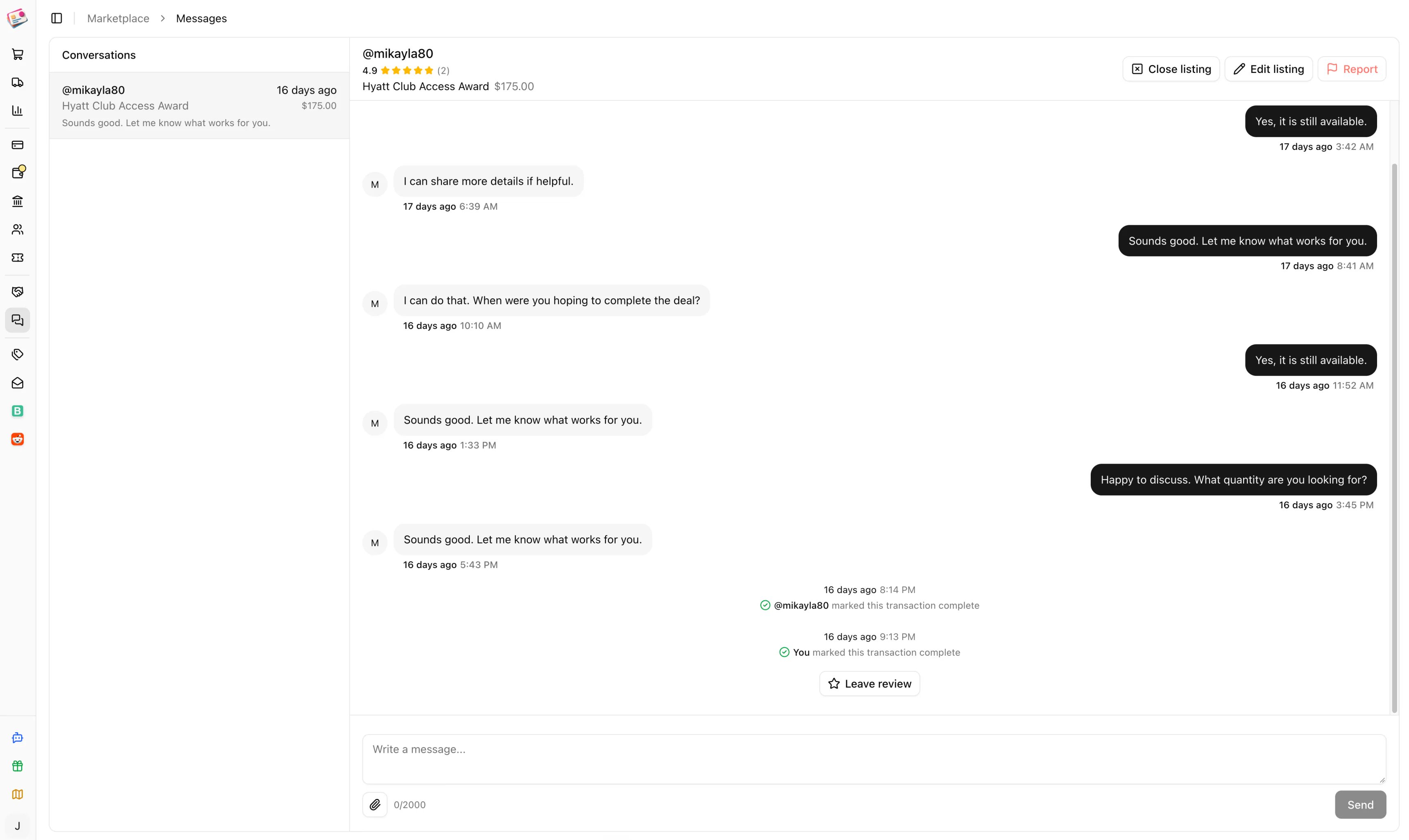
Every trade happens in a message thread tied to one listing. Keeping it there gives both sides a record, and it's how a trade gets marked complete and reviewed. Threads are under **Marketplace → Messages**; the sidebar badge counts unread ones.
 ## Start a conversation
Click the message icon on any listing in the catalog or on an item sheet, write your opening message, and send. If you already have a thread for that listing, you're taken to it. Messages can be up to 2,000 characters, with up to five images attached. Enter sends; Shift+Enter adds a line.
You get an email for new messages unless you already have an unread message from the same person in the last ten minutes.
## Complete a trade
The **Mark complete** button only unlocks once the thread has at least five messages and is more than eight minutes old, so the conversation needs to happen in Churning Tracker.
Click **Mark complete** and confirm the quantity and price, which start from the listing. For points you can enter a total or a cents-per-point figure.
The other party gets a prompt, and a reminder two days later if they haven't responded. Their button reads **Confirm complete**.
When both sides have marked it, the trade is final. If your numbers match, the sale shows as verified in the item's sale history. Both profiles update their completed-trade counts.
While a deal is in progress, the listing owner can **Mark pending** on the listing from the thread header. After both sides complete, the owner can **Close listing** to mark it sold, or **Edit listing** if there's quantity left.
## Leave a review
Once both parties have completed the trade, **Leave review** appears. Rate communication and accuracy from one to five stars and add an optional note. Reviews can't be edited afterward. Your rating, shown next to your name on every listing, is the average of all the scores you've received. Both sides get a reminder three days after a trade if they haven't reviewed.
## Reporting a user
If something goes wrong, click **Report** in the thread header. Pick a reason (scam, harassment, unresponsive, inaccurate listing, or other) and describe what happened. One report per thread. Reports from a group thread go to that group's admins and moderators under **Disputes**; reports from public threads go to Churning Tracker's moderators.
This documentation is built and hosted on [Mintlify](https://mintlify.com), a developer documentation platform.
## Start a conversation
Click the message icon on any listing in the catalog or on an item sheet, write your opening message, and send. If you already have a thread for that listing, you're taken to it. Messages can be up to 2,000 characters, with up to five images attached. Enter sends; Shift+Enter adds a line.
You get an email for new messages unless you already have an unread message from the same person in the last ten minutes.
## Complete a trade
The **Mark complete** button only unlocks once the thread has at least five messages and is more than eight minutes old, so the conversation needs to happen in Churning Tracker.
Click **Mark complete** and confirm the quantity and price, which start from the listing. For points you can enter a total or a cents-per-point figure.
The other party gets a prompt, and a reminder two days later if they haven't responded. Their button reads **Confirm complete**.
When both sides have marked it, the trade is final. If your numbers match, the sale shows as verified in the item's sale history. Both profiles update their completed-trade counts.
While a deal is in progress, the listing owner can **Mark pending** on the listing from the thread header. After both sides complete, the owner can **Close listing** to mark it sold, or **Edit listing** if there's quantity left.
## Leave a review
Once both parties have completed the trade, **Leave review** appears. Rate communication and accuracy from one to five stars and add an optional note. Reviews can't be edited afterward. Your rating, shown next to your name on every listing, is the average of all the scores you've received. Both sides get a reminder three days after a trade if they haven't reviewed.
## Reporting a user
If something goes wrong, click **Report** in the thread header. Pick a reason (scam, harassment, unresponsive, inaccurate listing, or other) and describe what happened. One report per thread. Reports from a group thread go to that group's admins and moderators under **Disputes**; reports from public threads go to Churning Tracker's moderators.
This documentation is built and hosted on [Mintlify](https://mintlify.com), a developer documentation platform.