> ## Documentation Index
> Fetch the complete documentation index at: https://docs.churningtracker.com/llms.txt
> Use this file to discover all available pages before exploring further.
# Resale orders
> Track items you buy to flip yourself on eBay or a marketplace, from purchase through sale and payout.
An Other Resale order is for inventory you sell on your own rather than through a buying group or reseller: eBay, Facebook Marketplace, or anywhere else. It has its own set of statuses that follow the item from purchase to a confirmed sale, and it can carry tracking numbers for the outbound shipment.
 ## Add an order
On the **Other Resale** tab, click **Add order**.
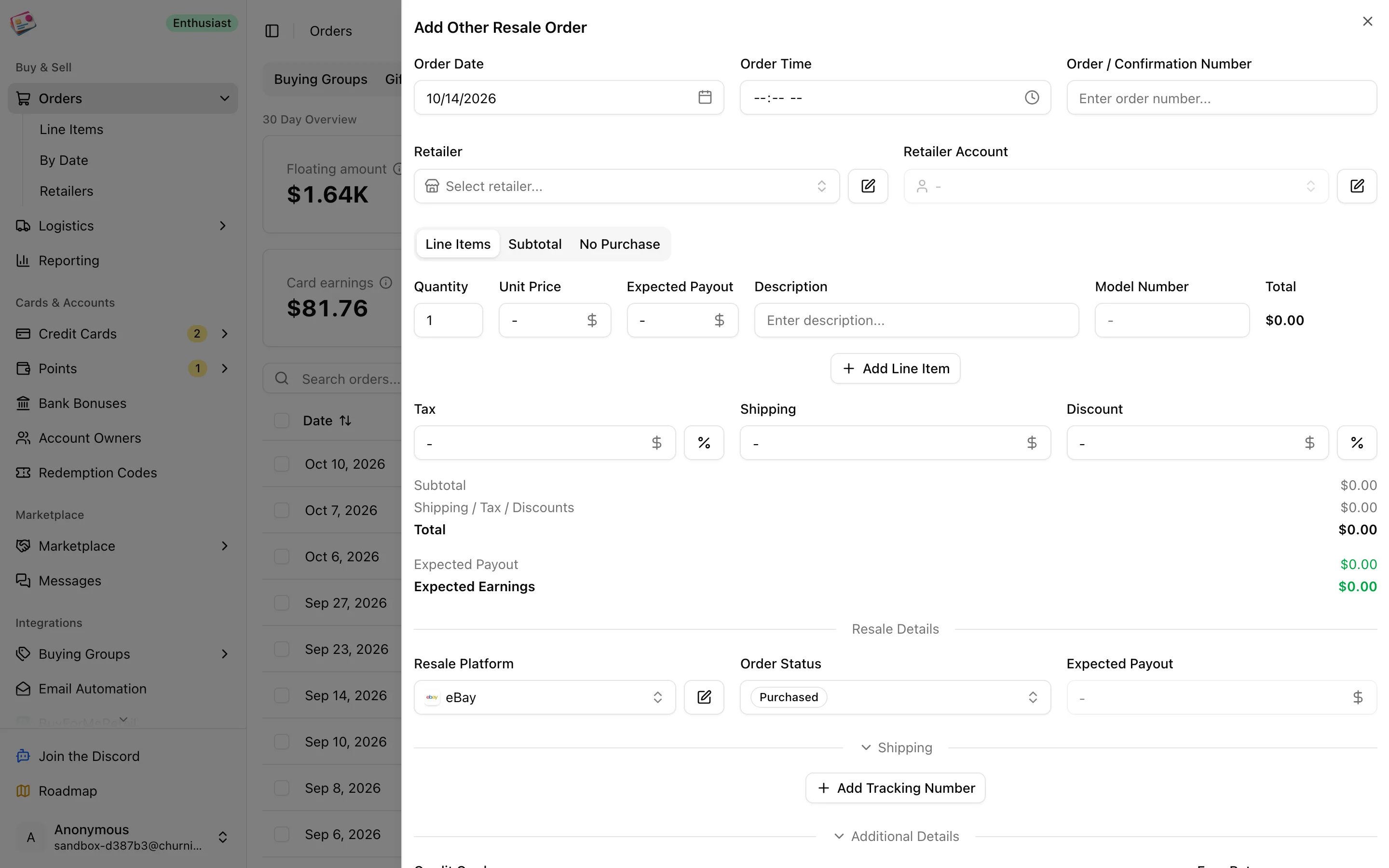
Order date, order number, retailer, and retailer account, then one line per item with quantity, unit price, expected payout, description, and model number.
Under **Resale Details**, choose eBay, Marketplace, or a custom platform. Status defaults to Purchased.
Add outbound tracking numbers under **Shipping** when you ship to the buyer; see [Shipments](/shipments). Pick the credit card under **Additional Details**, and add cashback, codes, tags, or notes if needed.
Click **Add Order**.
## Statuses
| Status | Meaning |
| - | - |
| Purchased | Bought, not yet in hand |
| In Inventory | Received and waiting to be listed |
| Listed | Up for sale |
| Pending | Sold, payment not yet confirmed |
| Sold | Sold |
| Shipped | Sent to the buyer |
| Delivered | Arrived with the buyer |
| Confirmed | Payment received in full |
| Returned | Came back; excluded from spending and profit |
| Issue | Something needs attention |
When a shipment is delivered, an order that hasn't reached Delivered yet moves there on its own. Recording a completed [payout](/payouts) moves the order to Confirmed when the amount reaches the expected payout within 3%, or to Pending if it was still before the Sold stage. Everything else you set yourself.
In [Reporting](/reporting), Confirmed plays the role that Paid plays for buying group orders, and Returned plays the role of Cancelled.
This documentation is built and hosted on [Mintlify](https://mintlify.com), a developer documentation platform.
## Add an order
On the **Other Resale** tab, click **Add order**.
Order date, order number, retailer, and retailer account, then one line per item with quantity, unit price, expected payout, description, and model number.
Under **Resale Details**, choose eBay, Marketplace, or a custom platform. Status defaults to Purchased.
Add outbound tracking numbers under **Shipping** when you ship to the buyer; see [Shipments](/shipments). Pick the credit card under **Additional Details**, and add cashback, codes, tags, or notes if needed.
Click **Add Order**.
## Statuses
| Status | Meaning |
| - | - |
| Purchased | Bought, not yet in hand |
| In Inventory | Received and waiting to be listed |
| Listed | Up for sale |
| Pending | Sold, payment not yet confirmed |
| Sold | Sold |
| Shipped | Sent to the buyer |
| Delivered | Arrived with the buyer |
| Confirmed | Payment received in full |
| Returned | Came back; excluded from spending and profit |
| Issue | Something needs attention |
When a shipment is delivered, an order that hasn't reached Delivered yet moves there on its own. Recording a completed [payout](/payouts) moves the order to Confirmed when the amount reaches the expected payout within 3%, or to Pending if it was still before the Sold stage. Everything else you set yourself.
In [Reporting](/reporting), Confirmed plays the role that Paid plays for buying group orders, and Returned plays the role of Cancelled.
This documentation is built and hosted on [Mintlify](https://mintlify.com), a developer documentation platform.