> ## Documentation Index
> Fetch the complete documentation index at: https://docs.churningtracker.com/llms.txt
> Use this file to discover all available pages before exploring further.
# Settings and account
> Signing in, customizing the app, notifications, passkeys and the extension code, billing, and referrals.
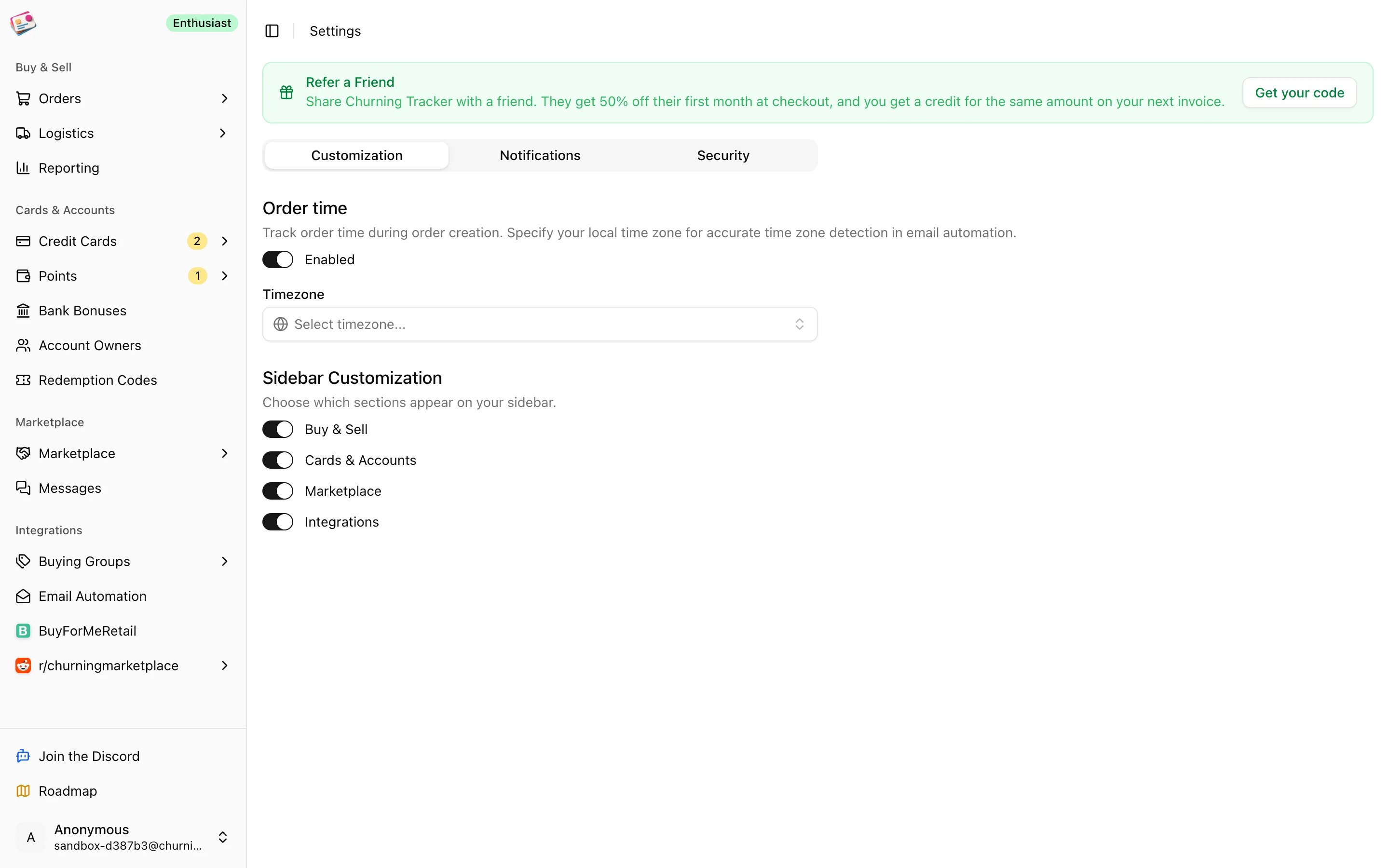
Settings open from the user menu at the bottom of the sidebar. They cover how the app looks, which emails and Discord messages you get, and how you sign in. Billing and referrals are in the same menu.
 ## Signing in
Sign in with Google, with a passkey, or with a code emailed to you that's valid for ten minutes. Add a passkey under **Settings → Security** once you're in, and you can skip the email code on that device from then on. There's no password.
## Customization
* **Order time**: adds a time field next to the order date on order forms, and sets the timezone used for orders created by email automation.
* **Sidebar**: hide whole sidebar groups you don't use. The Buy & Sell, Cards & Accounts, Marketplace, and Integrations groups can each be switched off, as long as one stays.
## Notifications
* **Discord webhooks**: one for [marketplace alerts](/marketplace/alerts) and one for [buying group deal alerts](/buying-groups/deal-alerts). Paste a webhook URL and click **Test connection**; it's saved only if the test message posts. Use the unlink icon to remove one.
* **Marketing emails**: product tips, feature updates, and offers.
* **Reminder emails**: reminders about card renewals and benefits.
Some emails always send: sign-in codes, buying group disconnection notices, marketplace messages and trade prompts, listing expiry warnings, planned card close reminders, and alerts you've created.
## Security
* **Passkeys**: add, rename, or remove the passkeys that can sign in to your account.
* **Chrome Extension Access Code**: generate the code the [Chrome extension](/imports/chrome-extension) uses to connect, copy it, or regenerate it to cut off an old install.
## Billing and referrals
On a paid plan, **Billing** in the user menu opens the Stripe customer portal, where you can change plans, update your card, see invoices, or cancel. Upgrading from Free starts with **Go Pro!** in the sidebar, which takes you to checkout; promo codes are accepted there. What each plan includes, and what happens when you downgrade, is on [Plans and limits](/plans-and-limits).
**Refer a Friend**, also in the sidebar on paid plans, generates a referral code. A friend who subscribes with it gets half off their first month, and you get a matching credit on your next invoice.
## Sandbox accounts
The [sandbox](https://app.churningtracker.com/sandbox) creates a throwaway account with sample data. It can't use the Marketplace or upgrade, and it's deleted automatically after a day or two. To keep your data, sign in with a real account and start fresh; there's no way to convert a sandbox account.
This documentation is built and hosted on [Mintlify](https://mintlify.com), a developer documentation platform.
## Signing in
Sign in with Google, with a passkey, or with a code emailed to you that's valid for ten minutes. Add a passkey under **Settings → Security** once you're in, and you can skip the email code on that device from then on. There's no password.
## Customization
* **Order time**: adds a time field next to the order date on order forms, and sets the timezone used for orders created by email automation.
* **Sidebar**: hide whole sidebar groups you don't use. The Buy & Sell, Cards & Accounts, Marketplace, and Integrations groups can each be switched off, as long as one stays.
## Notifications
* **Discord webhooks**: one for [marketplace alerts](/marketplace/alerts) and one for [buying group deal alerts](/buying-groups/deal-alerts). Paste a webhook URL and click **Test connection**; it's saved only if the test message posts. Use the unlink icon to remove one.
* **Marketing emails**: product tips, feature updates, and offers.
* **Reminder emails**: reminders about card renewals and benefits.
Some emails always send: sign-in codes, buying group disconnection notices, marketplace messages and trade prompts, listing expiry warnings, planned card close reminders, and alerts you've created.
## Security
* **Passkeys**: add, rename, or remove the passkeys that can sign in to your account.
* **Chrome Extension Access Code**: generate the code the [Chrome extension](/imports/chrome-extension) uses to connect, copy it, or regenerate it to cut off an old install.
## Billing and referrals
On a paid plan, **Billing** in the user menu opens the Stripe customer portal, where you can change plans, update your card, see invoices, or cancel. Upgrading from Free starts with **Go Pro!** in the sidebar, which takes you to checkout; promo codes are accepted there. What each plan includes, and what happens when you downgrade, is on [Plans and limits](/plans-and-limits).
**Refer a Friend**, also in the sidebar on paid plans, generates a referral code. A friend who subscribes with it gets half off their first month, and you get a matching credit on your next invoice.
## Sandbox accounts
The [sandbox](https://app.churningtracker.com/sandbox) creates a throwaway account with sample data. It can't use the Marketplace or upgrade, and it's deleted automatically after a day or two. To keep your data, sign in with a real account and start fresh; there's no way to convert a sandbox account.
This documentation is built and hosted on [Mintlify](https://mintlify.com), a developer documentation platform.