
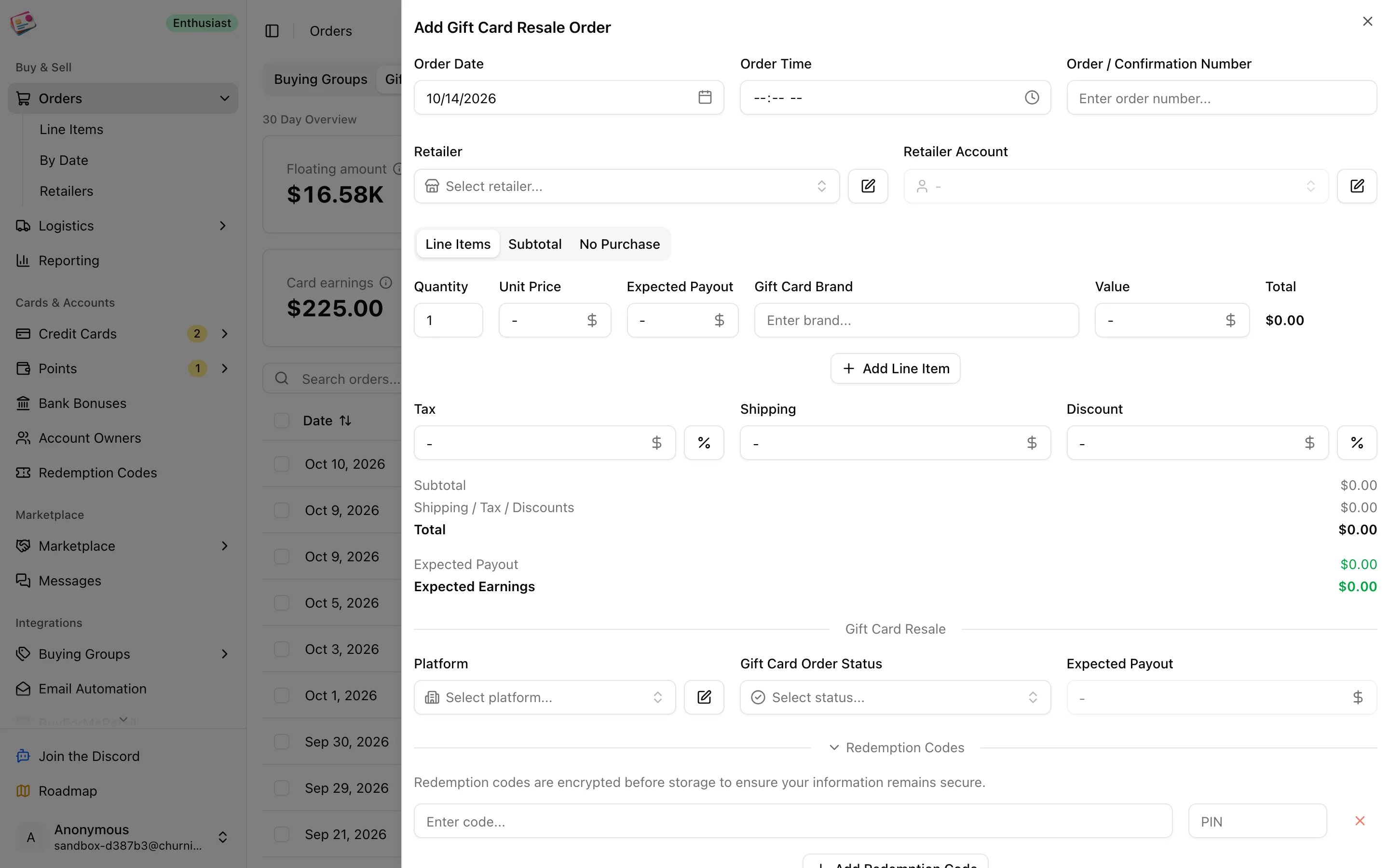
Add an order
1
Open the form
On the Gift Card Resale tab, click Add order.
2
Enter the order basics
Order date, order number, retailer, and retailer account, as on any order.
3
Add the cards
One line per brand and denomination: quantity, unit price, expected payout per card, the gift card brand, and the card’s face value. Every line needs a value greater than zero.
4
Pick the platform and status
Choose the reseller under Gift Card Resale: Aligned Incentives, Card Center, Card Cash, or a custom platform of your own. Status defaults to Ordered.
5
Add the codes
The Redemption Codes section is open by default. Enter each code and PIN; the brand and value come from the line items. See Redemption codes for bulk entry.
6
Add card, cashback, and extras
Under Additional Details, pick the credit card and adjust the earn rate. If you went through a portal, open Cashback / Rewards and add it to the order. Tags and notes are optional.
7
Save
Click Add Order.
Statuses
Partially Paid and Paid are set for you when you record a payout. The rest you set yourself.